

Timestamped feedback that actually lands
"Tighten the verse" is useless. "0:39 - the triplets feel rushed" is a fix. A full guide to giving mix notes your band can act on, and the tooling that makes specificity easy.
By @KHeavy · Updated 1 August 2026
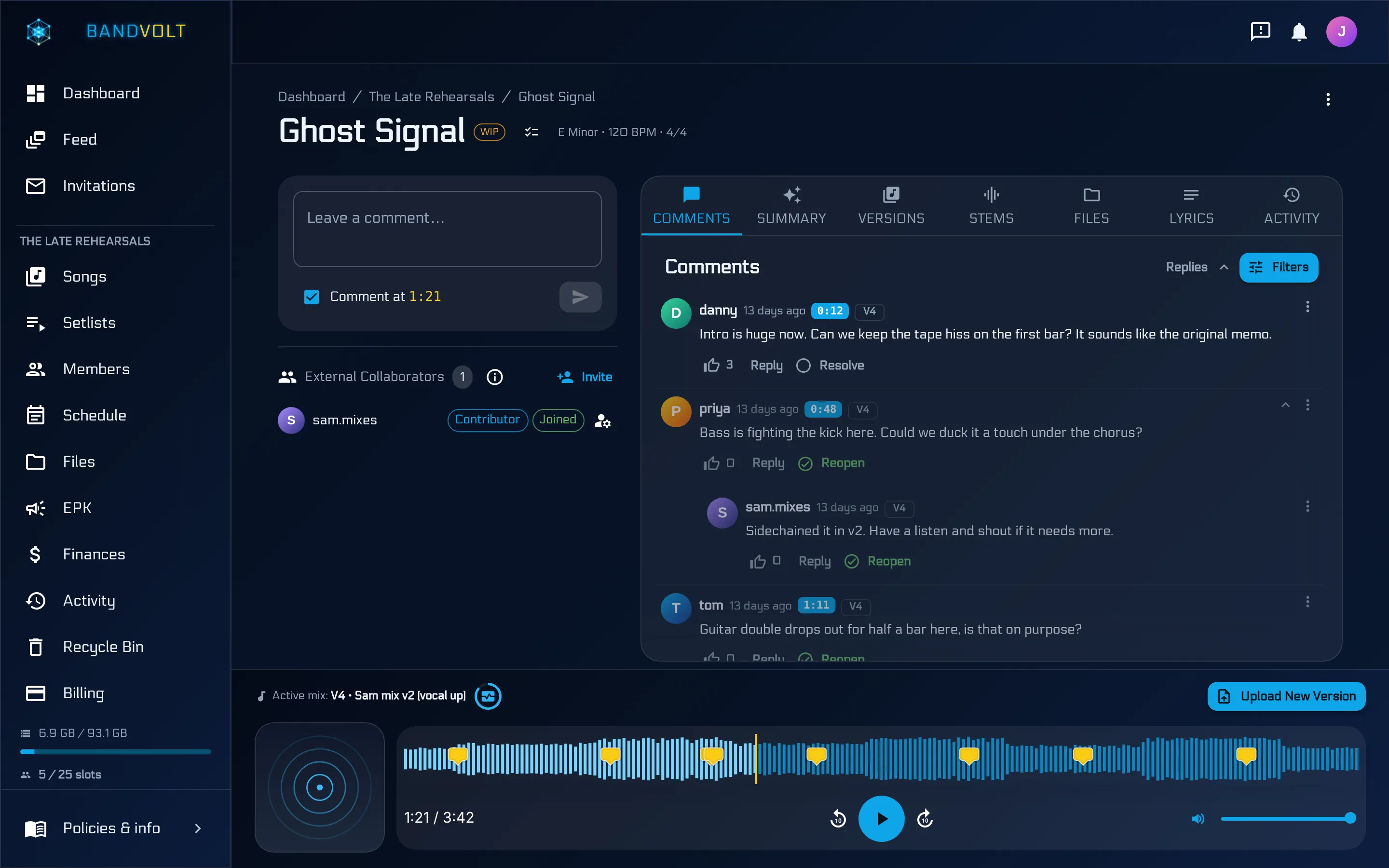
The short answer: the best way to give feedback on a mix is to pin every note to a timestamp - “0:39, the triplets feel rushed” instead of “the verse feels off”. BandVolt does this on the waveform itself, so every comment lives at the exact second it is about, attached to the version it was written for.
Most band feedback is vague because the tool gets in the way.
You hear something off in the second chorus. You type “second chorus feels weird” into the chat. By the time anyone reads it, they cannot remember which mix you were on, and “weird” could mean ten different things.
Good notes are specific. Good tools make specificity easy.
What bad feedback costs
It is tempting to treat vague notes as a minor annoyance. They are not. They are the main reason songs stall between “nearly done” and “done”.
Here is the loop. Someone leaves an unclear note. The person mixing guesses at what it meant and makes a change. The band listens and the thing they were bothered by is still there, because the guess was wrong. Nobody wants to be difficult, so instead of saying “that is not what I meant” they say “yeah, better”, and the song ships with the problem in it - or, more often, it does not ship at all, because it never quite feels finished and nobody can articulate why.
Every round of that costs a bounce, an evening, and a bit of everyone’s enthusiasm. Bands do not usually run out of ideas. They run out of patience with the process.
Pin it to the second
Open the song. Click the waveform at the exact moment. Type the note. That comment is now anchored to 1:47 forever - and to that version of the song.
When the singer opens the track next morning, the comment is sitting on the waveform. They click it, the playhead jumps to the spot, they hear what you heard.
That is the whole mechanism, and it is deliberately unremarkable. The value is not the cleverness - it is that the friction of being specific drops to roughly zero. You do not have to write “about two thirds of the way through the second chorus, just after the fill”. You click the fill.
The anatomy of a note that works
Timestamps handle where. You still have to handle what and what instead. The notes that get acted on almost always have three parts:
- The moment. Handled by the timestamp.
- What you hear. “The vocal drops behind the rhythm guitars.”
- What you would rather. “Can it come up a couple of dB, or the guitars come down.”
Compare:
“The verse is muddy.”
with:
0:48 - “The bass and the low end of the piano are fighting here. Could we high-pass the piano a bit so the bass has room?”
The second one is longer to type and about ten times faster to act on. It also survives being read by somebody who is not in your head - a producer, a mix engineer, a session player who joined last week.
Notes to avoid
- “Something’s off.” If you cannot say what, say that honestly: “something bothers me here and I cannot pin it down” is at least a useful flag.
- “Make it punchier.” Punchier is not a control on any desk. Try “the snare gets lost when the guitars come in”.
- “I preferred the old one.” Preferred which part, and compared to which version? This one is worth comparing properly before you say it.
- Notes about the arrangement in a mix round. “I think the bridge should be shorter” is a real note, but it is a different job from mixing, and dropping it into a mix pass derails the session.
Reply threads, not new threads
Replies stay attached. So “the triplets feel rushed” turns into a short conversation about whether to slow them or push them earlier, and the entire discussion is still pinned to 1:47 - not scattered across three different DMs.
This matters more than it looks. In a chat, a disagreement about one bar of music produces a wall of messages that pushes every other note off screen. Threaded against the timestamp, that same disagreement stays exactly where it belongs, and the four other notes on the song remain readable.
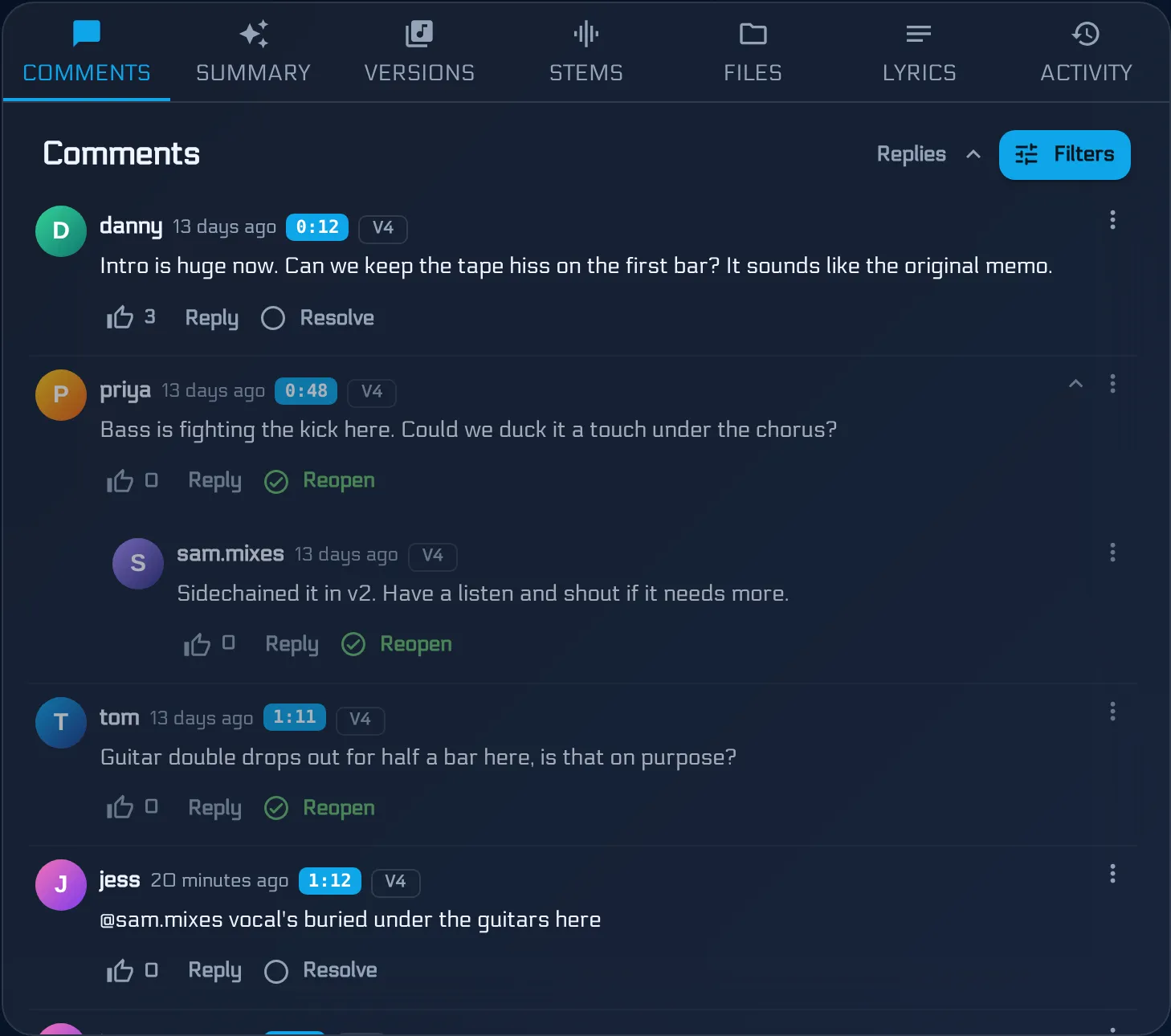
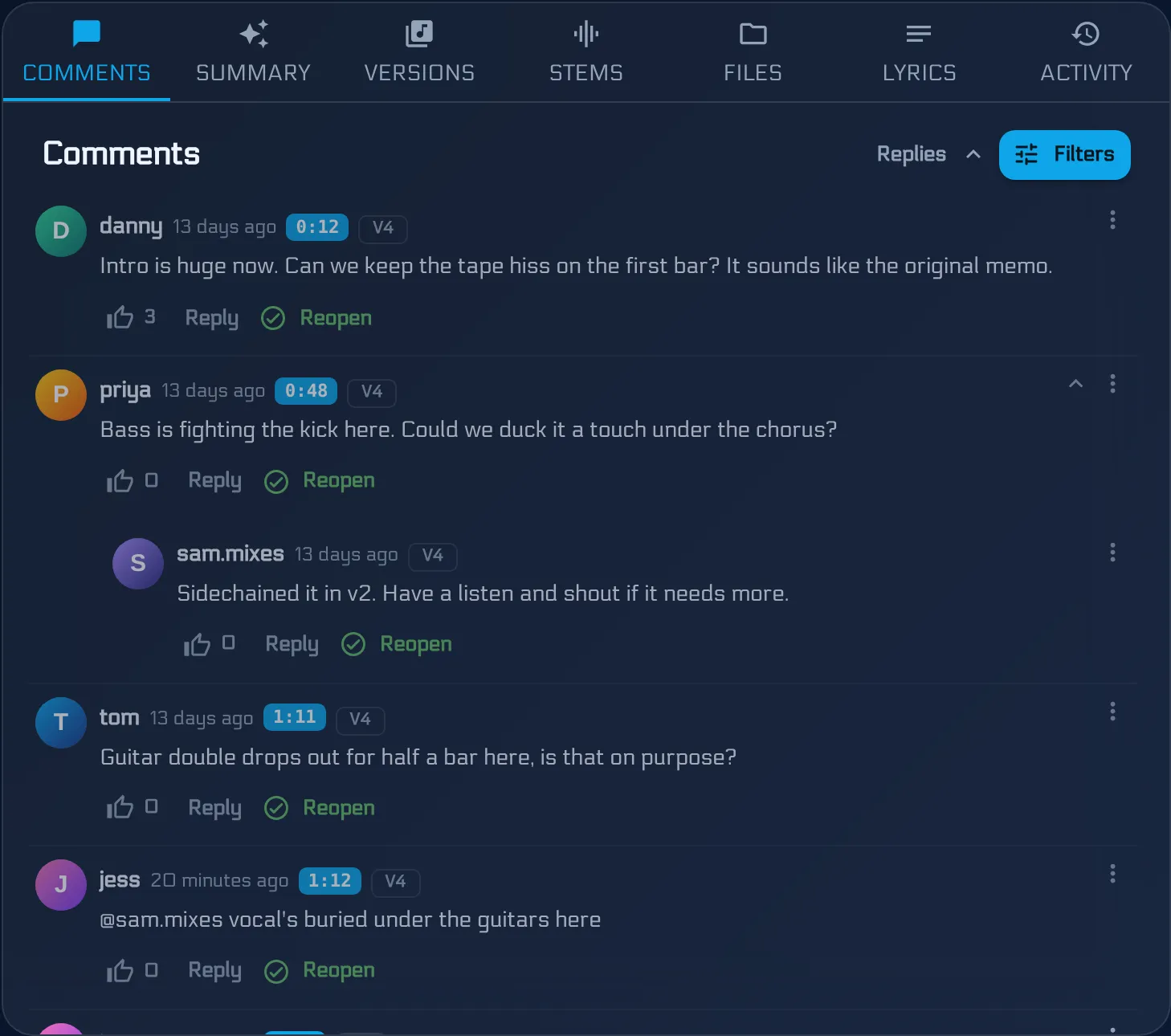
Notes can also be resolved once they have been actioned. That turns the comment list from an ever-growing pile into a work queue that visibly shrinks - and it means the next person to open the song can see what is still outstanding without reading the whole history.
When there are forty notes
There is a point, usually around the third or fourth mix of a song people care about, where the feedback stops being useful because there is too much of it. Five people, forty comments, half of them saying versions of the same thing.
That is what AI Mix Summary is for. It reads the unresolved comments and turns them into a prioritised punch list - grouping the four different ways people said “the vocal is buried” into one item, and pushing genuine one-offs down the list.
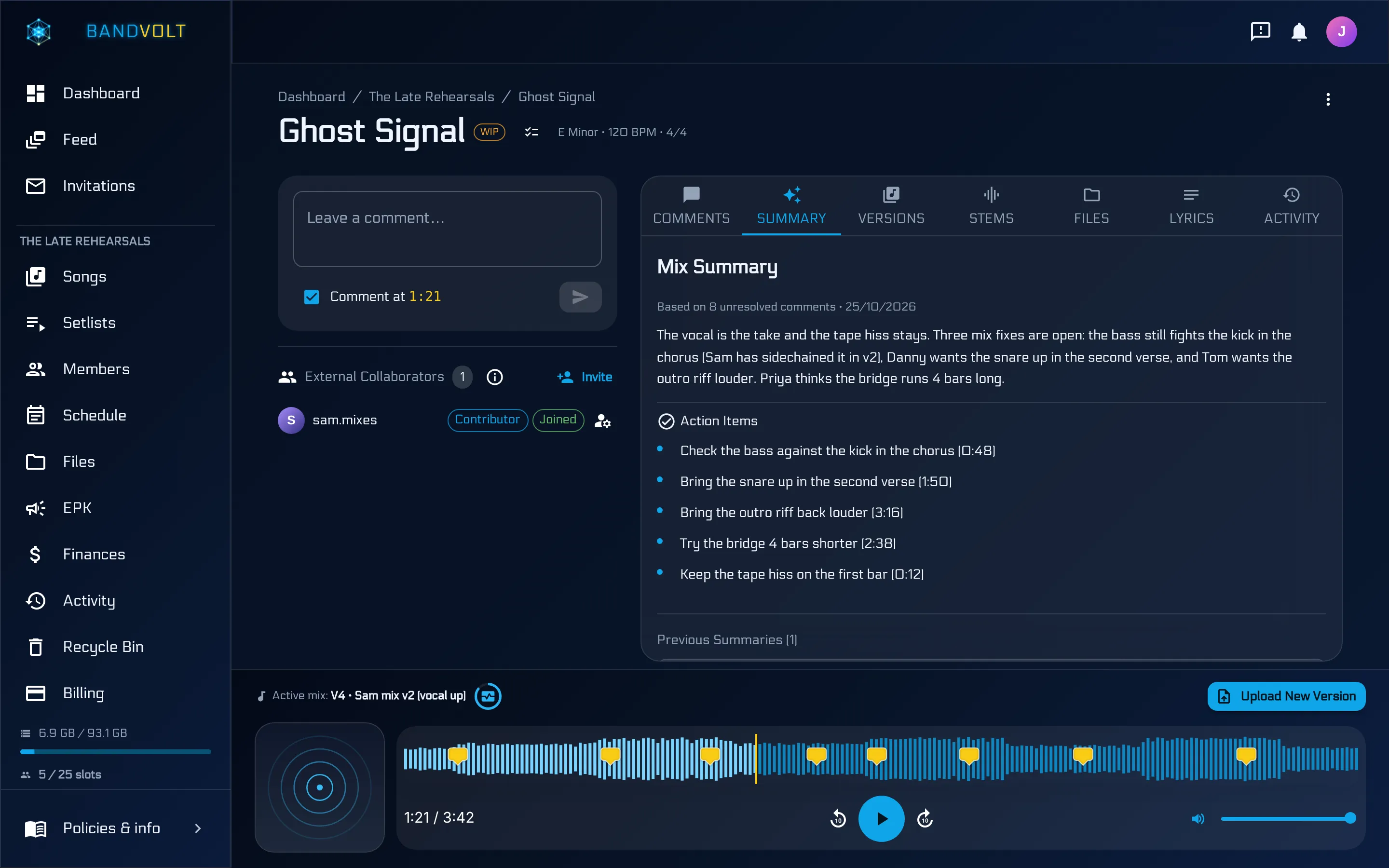
It costs 1 Volt per summary, and Basic bands get 10 Volts a month. The point is not the AI. The point is that a producer should be able to walk into a session with a list, not a scroll-back.
Feedback and versions belong together
A note is only meaningful against the mix it was written about. “The vocal is buried at 1:47” is true of version 4 and possibly nonsense about version 6.
Because BandVolt attaches comments to the version, you get something like a change log for the song: the note, the version it was made against, whether it was resolved, and the next version that came out of it. When somebody asks “did we ever fix that thing in the bridge?”, the answer is on the screen instead of in someone’s memory.
That is also why keeping mix versions properly and giving good feedback are really the same discipline. Feedback without version history is unanchored; version history without feedback is just a list of files.
What this replaces
Worth being blunt about the alternative, because most bands are living in it.
The group chat is a genuinely bad place for mix notes, and not because of anything wrong with WhatsApp. Chat is built for a conversation that moves forward in time. A mix discussion moves back and forth across three and a half minutes of audio. The two shapes do not fit, so notes get lost, timestamps get typed by hand and then misread, and audio gets compressed to something you cannot judge a mix on anyway.
We wrote about that mismatch in more detail in WhatsApp vs timestamped mix feedback. The short version: keep the chat for arranging lifts to the gig. Keep the mix notes on the mix.
Start with one song
You do not need to move your whole catalogue to change how your band gives feedback. Take the song that has been “nearly finished” the longest, upload the current mix, and ask everyone to leave notes on the waveform instead of in the chat.
The first thing most bands notice is not that the feedback is better. It is that there is less of it - because when people have to point at a moment, the vague grumbles quietly disappear and what is left is the stuff that actually needs fixing.
Frequently asked questions
What is timestamped feedback?
Timestamped feedback is a comment attached to a specific moment in an audio file rather than to the file as a whole. Instead of "the second chorus feels off", the note lives at 2:14 and clicking it moves the playhead there. It removes the guesswork about which part of the song somebody meant.
How do you give useful feedback on a mix?
Say where, say what you hear, and say what you want instead. "1:47, the vocal disappears under the guitars, can it come up a couple of dB" is actionable. "The mix feels muddy" is not, because it gives the person mixing nothing to change. Pinning the note to a timestamp handles the "where" automatically.
Why is giving mix feedback in a group chat a problem?
Chat has no concept of the song. Notes scroll away, they do not say which version they refer to, and they cannot point at a moment in the audio. By the time someone sits down to work through them, they are scrolling back through unrelated messages trying to reconstruct what was meant.
Should everyone in the band comment on a mix?
Yes, but with roles in mind. The person who wrote the part usually hears different things from the person playing it. What matters is that notes are specific and that duplicate notes are visible as duplicates - four people saying the vocal is buried is much stronger signal than one person saying it four times.
Topics: timestamped feedback for musicians · waveform comments app · mix notes · band feedback