

Stop sending `final_FINAL_v3.mp3`
A complete guide to mix version control for bands - why file naming always fails, what a real version history looks like, and how to keep every mix findable, comparable, and clear.
By @KHeavy · Updated 1 August 2026
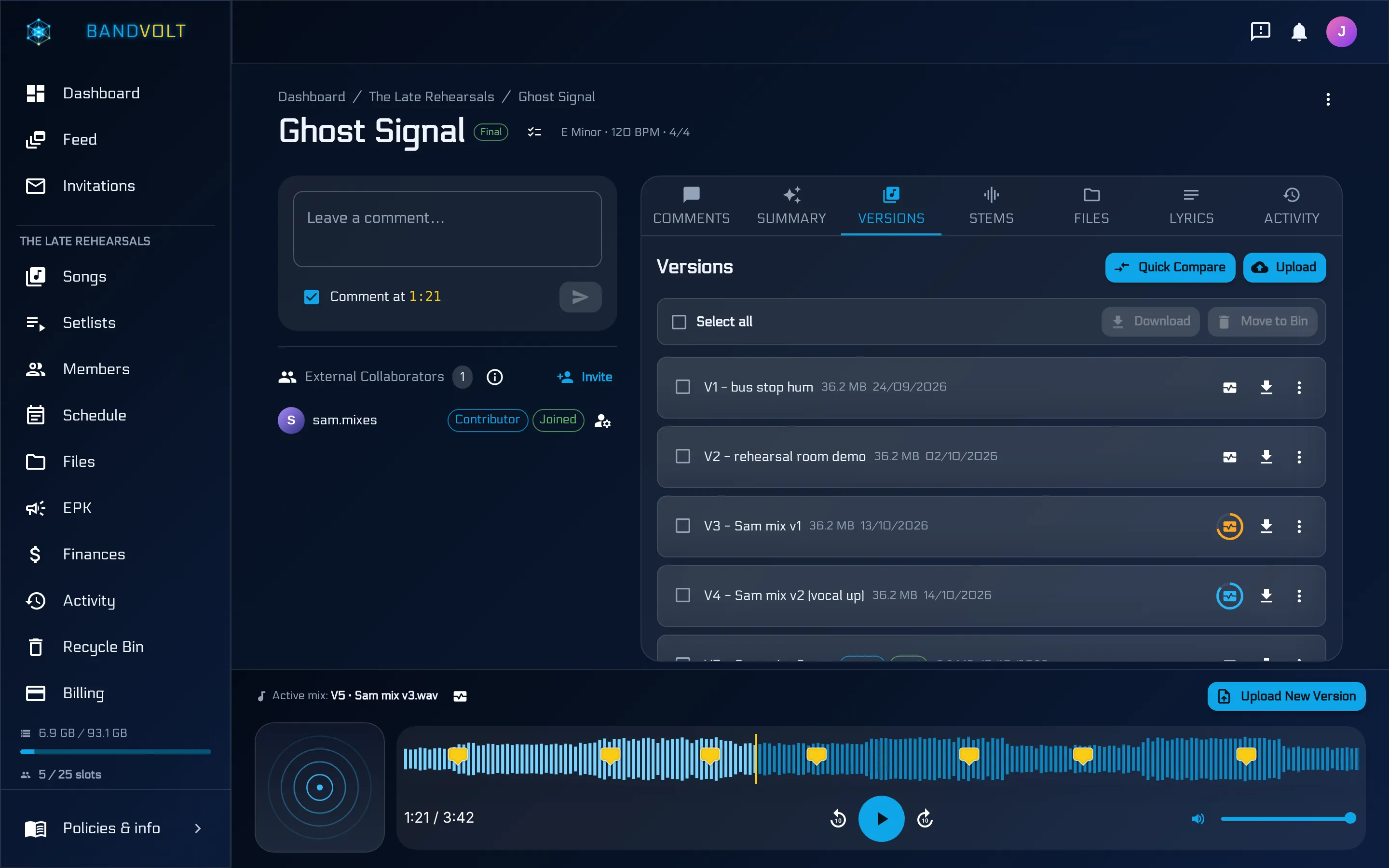
The short answer: the way to manage mix versions is to keep every mix as a labelled, dated version of one song in one place - not as renamed files scattered through a chat thread. In BandVolt, each upload becomes the next version in the song’s history, so the latest mix is always obvious. Here is why that matters, and what it looks like in practice.
You know the filename. Everyone has sent one.
mix_v2.mp3
mix_v2_REAL.mp3
mix_v2_REAL_actuallyfinal.mp3
mix_v3_postmaster_LOUDER.mp3
By Friday nobody knows which one to play at rehearsal. The guitarist is referencing the version from Tuesday, the producer is talking about Wednesday’s, and the drummer just downloaded whichever showed up most recently in the chat.
This is not a naming problem. It is a structure problem.
Why file naming always breaks
Every band eventually tries to fix this with a convention. “From now on we name everything songname_v#_date.” It lasts about three weeks. Here is why it cannot survive contact with a real band:
- Filenames have no order.
v10sorts beforev2on most systems.finalsorts beforemix. The one place a computer could help you, it actively works against you. - Two people can make the same version. The producer bounces v4 on Sunday. The bassist, who never got the message, bounces their own v4 on Monday. Now there are two v4s and no way to tell them apart except by asking.
- Dates lie. Re-download a file and the modified date resets to today. Copy a folder and every file inside looks brand new. The metadata you would use to break a tie is the first thing to get destroyed.
- The discussion lives somewhere else. Even a perfectly named file tells you nothing about what changed, what the band said about it, or which notes were already addressed. That context is in the chat, scrolling away.
- It depends on everyone being disciplined, always. At 1am after a session, nobody is careful. One person breaking the convention once is enough to break it for everybody.
A naming convention is a promise your band makes to its future self, and it is a promise bands do not keep. The fix is not more discipline. It is a structure where the correct behaviour is the only behaviour available.
One song, many versions
In BandVolt every upload after the first is a new version of the same song - not a new file. The list is dated, labelled, and ordered. v1 sits at the bottom. The latest sits at the top. Click any version to play it back in the same waveform player.
No more guessing which one is current. No more digging for the take you liked two weeks ago.
The mental shift is small but it changes everything: the song is the thing you open, and versions are what it contains. You do not go looking for a file. You go to “Hollow Ground” and the whole history of it is there - the phone demo from the rehearsal room, the first real tracking session, the mix with the re-recorded vocal, the one the producer sent back on Thursday.
What a version actually carries
A version in BandVolt is not just an audio file with a number stuck to it. Each one carries:
- The audio at full quality. Whatever you uploaded is what plays back and what downloads - no silent re-encode to a lossy copy.
- A label and a date. “Rough mix”, “vocal comp v2”, “post-master” - whatever your band actually calls things.
- Its own comment thread, pinned to the waveform at the seconds people were talking about.
- A Mix Health score, if someone has run one, so you can see at a glance whether it was technically release-ready.
Supporting files for the song - stems, lyrics, artwork - live on the song itself, so every version shares the same attachments rather than scattering them across folders.
The label is the ten seconds of typing that saves the hour later - it is the difference between “v4” and “v4, punchier bass mix”.
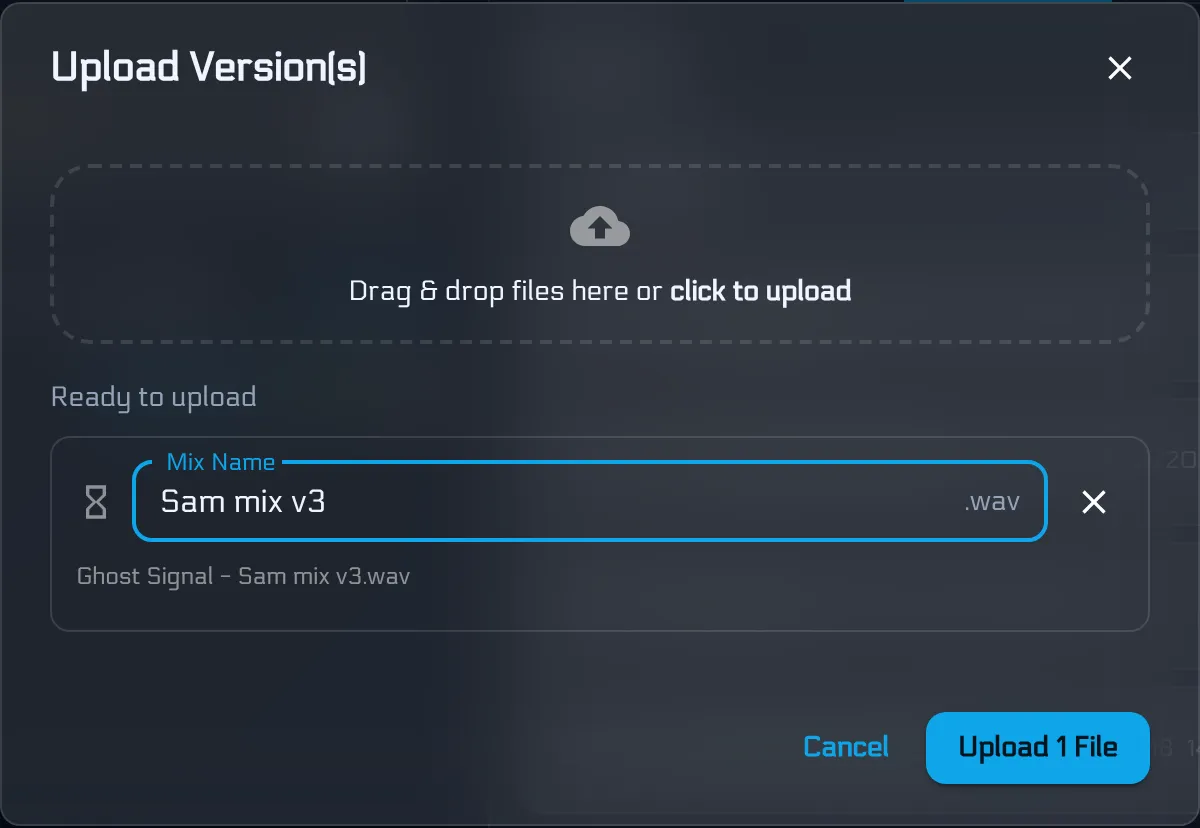
That last point matters more than it sounds. When a version carries its own context, “which mix was that?” stops being a question anyone has to ask.
Notes that follow the song
Comments live on the song, not the file. So when a new mix arrives, last week’s feedback is still right there - pinned to the seconds it referred to - and you can check whether the note actually got addressed.
This is the part that surprises bands. In a chat-and-drive workflow, uploading a new mix effectively wipes the discussion: the old notes are twelve screens up, referring to timestamps in a file nobody can find any more. Everyone starts again from scratch, which is why the same note gets given four times across four mixes and still never gets fixed.
When versions and comments live together, you get something closer to a build log. The note from v3 is still visible when you are listening to v6, so you can hear whether the snare actually came down or whether everyone just stopped mentioning it.
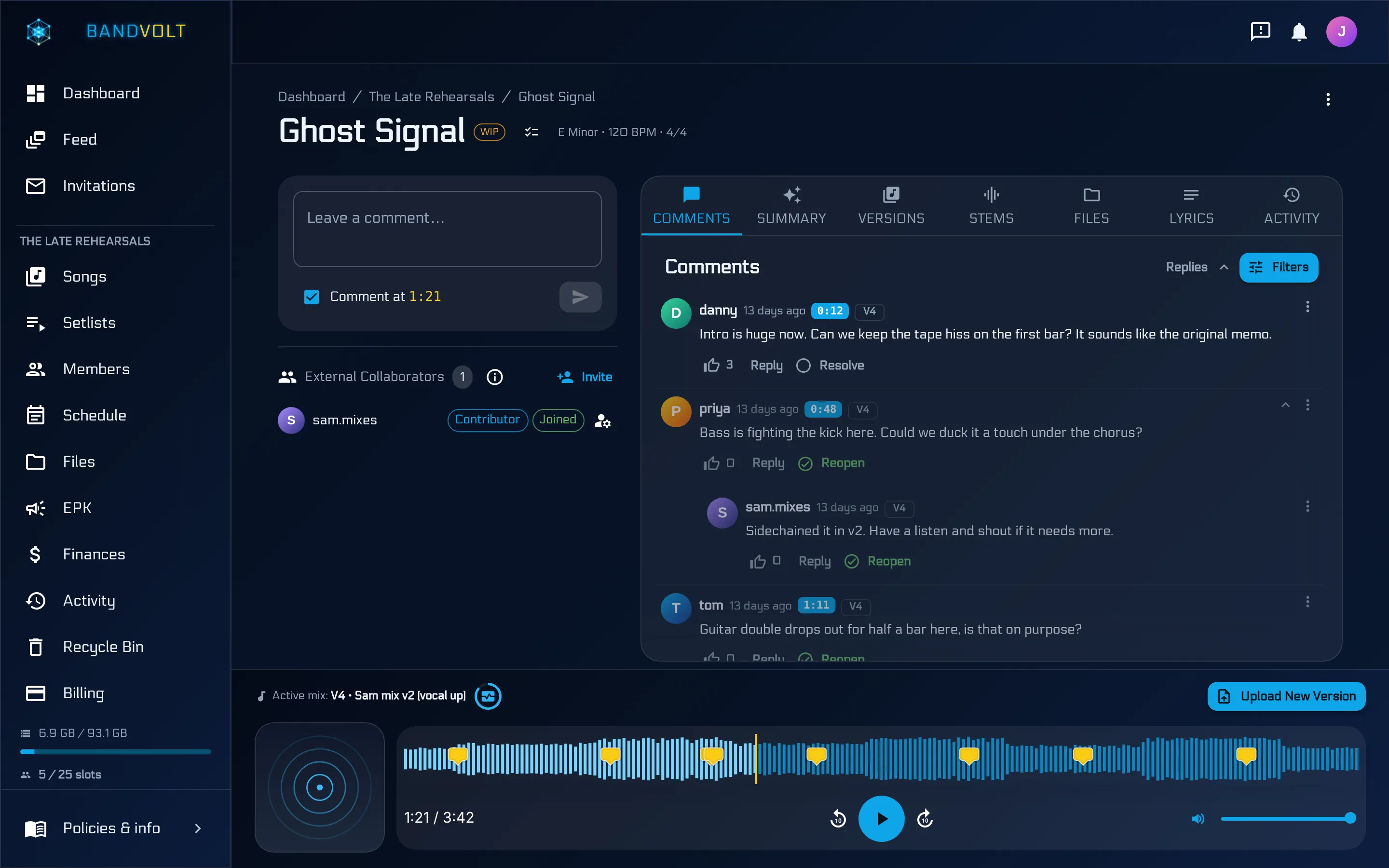
If you want the full argument for pinning notes to seconds rather than typing them into a group chat, that is its own guide: timestamped feedback that actually lands.
Hearing the difference, not arguing about it
Version history answers “which one is newest”. The harder question is “is the new one better”, and that is where most bands stall - because comparing two mixes properly means loading both, lining them up, and switching between them at the same point in the song. Nobody does that from a chat thread.
Quick Compare puts two versions side by side and lets you flip between them at the same playback position. Same second, same passage, different mix. The difference stops being something you debate and starts being something you point at.
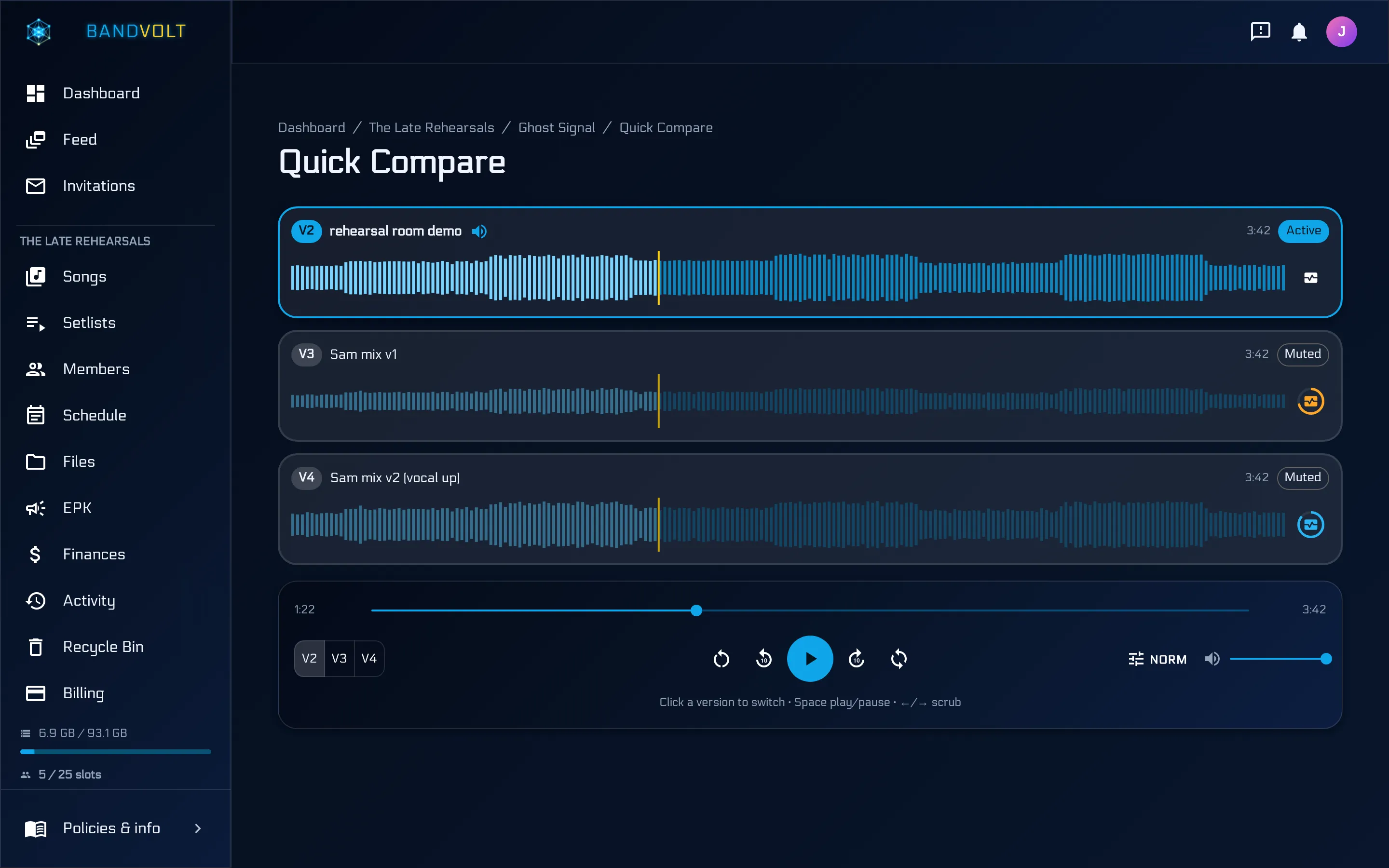
It is worth being honest about what this does and does not solve. It will not settle a genuine disagreement about whether the guitars should be louder - that is taste, and taste is the band’s job. What it does is stop you arguing from memory, which is where most mix arguments actually come from.
A workflow that survives a real week
Here is what version control looks like when it is working. It should be boring.
- Somebody bounces a mix. They upload it to the song. It becomes the newest version automatically. No name to agree on, no folder to pick.
- They give it a label. “Bass up 2dB, new vocal take.” Ten seconds of typing that saves an hour later.
- The band listens and leaves notes on the waveform - at the second, not in the abstract.
- The producer opens the notes, works through them, and bounces again. The new version lands on top; the old notes stay visible against the old version.
- Before it goes out, someone runs a Mix Health check to catch the technical problems - clipping, true peak, loudness - that are embarrassing to find after release.
Nothing in that list requires anyone to be organised. That is the point. The structure does the organising, so the band can spend its attention on the music.
What about the DAW project files?
Worth saying plainly, because it comes up: this is not a replacement for your DAW’s own versioning, and it is not trying to be. Logic, Ableton, and Pro Tools all track project files, and they should keep doing that - that is the engineer’s workspace.
Mix version control at the band level is a different job. It is about the bounces the band listens to and decides on: what everybody heard, what everybody said, and which one is current. Your producer keeps their session files. The band gets a shared history of the mixes that came out of them.
The rule of thumb
If your file naming convention is your version control, you do not have version control. You have a convention that works until the first tired evening, and after that you have a folder full of files with final in the name.
Give the song a home, put every version inside it, and keep the conversation attached. The rest looks after itself.
Bring order to your mixes - the Basic tier is free, and version history is included on it.
Frequently asked questions
How should a band organise mix versions?
Keep every mix as a labelled, dated version of one song in one place, rather than as separate files named by hand. The song is the container; each new bounce is the next version inside it. That way the newest mix is always obvious, older versions stay reachable, and feedback stays attached to the version it was written about.
Why does renaming files not work as version control?
Because a filename carries no order, no date anyone can trust, and no link to the discussion about it. Two people can create v3 independently, a re-download can silently rename a file, and a chat thread reorders itself around whoever posted last. Naming conventions rely on every member being disciplined every time, which is not how bands work at 1am.
Should we keep old mixes or delete them?
Keep them. Old versions cost almost nothing to store and they are the only way to answer "was the old chorus better?" without guessing. The reason bands delete old mixes is that they clutter a folder - in a proper version history they collapse into a list you scroll past.
What is the difference between a version and a stem?
A version is a complete bounce of the song at a point in time - the thing you play to decide whether it is finished. Stems are the separated parts, for whoever is mixing or remixing. In BandVolt both live on the song: versions in the version history, stems in their own Stems tab beside it, so a mix engineer opening the song finds the current mix and the parts in the same place.
Topics: mix version control · how to organize band mixes · demo versions · file naming