

BandVolt for studio engineers & producers
A client workspace for studio engineers and producers
Keep every client project in one place - each bounce versioned, every note pinned to the second, and a clean handover to the band when the job is done. No expiring zip links, no feedback scattered across email and WhatsApp.
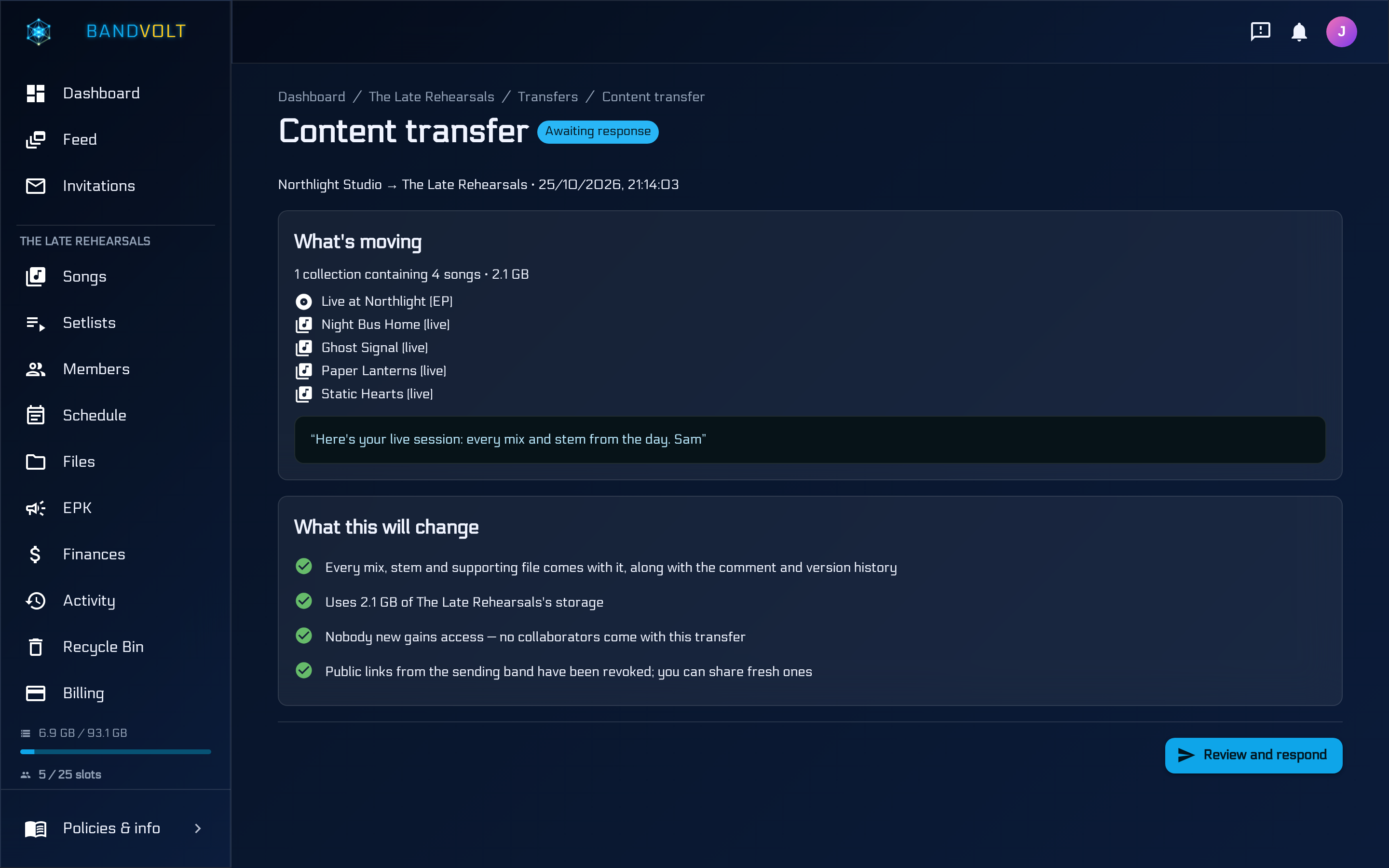
BandVolt gives mix engineers and producers two ways to work. If the band already uses BandVolt, they invite you as an external collaborator and you work inside their workspace - no plan or storage of your own needed. If they do not, you host the project in your own studio workspace, invite the musicians to review and comment, and hand the finished song or album to their band with a content transfer: every mix, stem, file, and comment history moves with it, and your storage frees when they accept.
One studio workspace, many clients
Create a band and treat it as your studio. Client projects sit in it as songs and Album/EP collections, each with its own version history, stems, supporting files, and comment thread - so one act's notes never bleed into another's.
Invite each client's musicians as external collaborators on just their song or collection. They hear the current mix and comment on the waveform without seeing anything else on your books. One collection invite covers every track on an album, including tracks added later.
Client feedback you can act on
"The bit before the last chorus" becomes a comment pinned at 2:41 on the exact version it was written about. Replies stay threaded, notes are resolved when they are done, and AI Mix Summary can turn a long thread into a prioritised punch list before the next session.
Quick Compare lines up two bounces at the same playback position, with loudness matching so the louder version does not win the conversation by default. Mix Health gives any version an objective 0-100 release-readiness check.
Deliver the project, not a zip
When the job is done, offer a content transfer to the client band. Their Owner reviews the storage impact and accepts, and the song or album moves permanently into their workspace - mixes, stems, supporting files, and the full comment and version history. There is no link to expire.
Sending needs Premium; the receiving band can stay on the free Basic tier as long as they have storage headroom. Finished client work leaves your allotment the moment they accept, so your workspace does not fill up with last year's jobs.
The features you will use most
- Content transfer
When the session is done, hand the song or album to the band that owns it - mixes, stems, supporting files, and the full history move with it. A clean studio delivery that beats expiring zip links. Premium to send; the receiving band can stay on Basic as long as they have room.
- Timestamped feedback
Every note lands on the waveform at the second it is about, attached to the version it was written for - so "the verse feels off" becomes "1:47, the triplets are rushed" and the band can actually act on it.
- Quick Compare
Line up two or more versions, keep the playhead where it is, and flip between them. Match levels when you need a fair listen - the difference stops being something you argue about and starts being something you hear.
- Version history
One song, every mix it has ever had, in chronological order. No more guessing whether the file in the chat is newer than the one in the shared drive.
- Mix Health
Mix Health gives any mix version an objective 0-100 release-readiness score, a plain-language label, and a criterion-by-criterion breakdown - so "is this ready to send?" stops being a matter of opinion.
Frequently asked questions
Can a mix engineer use BandVolt without paying for Premium?
Yes, when the client band already has BandVolt and invites you in. You work inside their workspace - comments, versions, Quick Compare - and their storage covers the files. Premium matters when you host the project in your own studio workspace and need external collaborators or content transfer to deliver.
Is BandVolt a WeTransfer or FilePass alternative for mix engineers?
For studio delivery, yes. WeTransfer and FilePass move files once and links expire. BandVolt content transfer permanently moves the finished song or album into the client band's workspace - mixes, stems, and comment history included. Premium to send; Basic can receive with enough storage.
Does BandVolt replace my DAW?
No. BandVolt does not record, edit, or open DAW project files. It sits alongside Logic, Ableton, Pro Tools, Reaper, or whatever you mix in, and handles what happens after the bounce: labelled versions, client feedback, stems and files on the song, and delivery.
Can clients listen without creating an account?
Yes. A public share link lets anyone stream a song - or, on Premium, a whole album or EP - instantly with no account, and you can revoke it at any time. To leave timestamped comments, invite them as a Reviewer or Contributor instead.
Read more on this
- BandVolt on Product Hunt: who it's for BandVolt review: what it does for bands, ensembles, teachers, studios, and labels, including the free EPK maker, after the 23 October 2026 Product Hunt launch.
- How studio engineers and producers use BandVolt Two workflows for mix engineers and producers - join a band that already uses BandVolt as a collaborator, or host the project in your own studio workspace and content-transfer it when the job is done.
- Mix revisions without the email chain: a workflow for engineers and their clients A revision workflow for mix engineers and producers - one version history per song, notes pinned to the second, a punch list before each pass, and a clear point where the mix is signed off.
- Studio mix delivery checklist: what to hand the band when the mix is done What a mix engineer or producer should deliver at the end of a job - the final mix, alternate versions, stems, technical checks, credits, and the feedback history - and how to hand it over so nothing expires.
- WeTransfer and FilePass vs BandVolt content transfer WeTransfer and FilePass move files once. BandVolt content transfer delivers the finished song or album into the client band's workspace - mixes, stems, and history included. Compare studio delivery options.
- Contributor and Reviewer - roles for external collaborators Invite someone as a Contributor who can upload and download, or as a Reviewer who can stream, Quick Compare, and comment - without file access. Premium only.
See the full feature tour, or how BandVolt works for bands & music groups and labels & artist managers .